1. pre-process :
1.1 Boruta to clean data column-wise
1.2 TomekLinks to clean data row-wise
2. training (use a random sample to do this step if the data size is too big):
2.1 create a basic with fixed learning rate and n_estimators:
XGBRFClassifier(objective='binary:logistic',
n_estimator=X,
learning_rate=0.1,
n_jobs=-1)
2.2 grid search for optimal 'max_depth' and 'min_child_weight'.
-- use scoring='roc_auc'
-- use cv = RepeatedStratifiedKFold(n_splits=3, n_repeats=3)
2.3 get 'current_best' by using gridsearch.best_estimator, then fit current_best again.
2.4 then grid search for 'gamma' with current_best, when it's done, get 'current_best' by using gridsearch.best_estimator, then fit current_best again.
2.5 then grid search for 'subsample' and 'colsample_bytree', when it's done, get 'current_best' by using gridsearch.best_estimator, then fit current_best again.
2.6 then grid search for 'learning_rate' , when it's done, get 'current_best' by using gridsearch.best_estimator, then fit current_best again.
3. final training: use all data to fit the mdl with all the optimized params.
4. Evaluatiion.
Showing posts with label Tricks. Show all posts
Showing posts with label Tricks. Show all posts
Tuesday, March 3, 2020


Friday, February 28, 2020
Assign bin labels to new values during model inference
In model development:
import pandas as pd
import numpy as np
np.random.seed(42)
bins = [0, 10, 15, 20, 25, 30, np.inf]
labels = bins[1:]
ages = list(range(5, 90, 5))
df = pd.DataFrame({"user_age": ages})
df["user_age_bin"] = pd.cut(df["user_age"], bins=bins, labels=False)
# sort by age
print(df.sort_values('user_age'))
In production, I will need to put individual age values to its corresponding bins. Here's how to do it:
# a new age value
new_age=30
# use this right=True and '-1' trick to make the bins match
print(np.digitize(new_age, bins=bins, right=True) -1)
import pandas as pd
import numpy as np
np.random.seed(42)
bins = [0, 10, 15, 20, 25, 30, np.inf]
labels = bins[1:]
ages = list(range(5, 90, 5))
df = pd.DataFrame({"user_age": ages})
df["user_age_bin"] = pd.cut(df["user_age"], bins=bins, labels=False)
# sort by age
print(df.sort_values('user_age'))
In production, I will need to put individual age values to its corresponding bins. Here's how to do it:
# a new age value
new_age=30
# use this right=True and '-1' trick to make the bins match
print(np.digitize(new_age, bins=bins, right=True) -1)
Wednesday, January 9, 2013
Two useful Excel tricks
I was using Excel today and find that I need to do two things. The first one is to automatically alternate row colors (one shaded, one white), so I searched online and found this tutorial very useful.
http://www.techonthenet.com/excel/questions/cond_format2.php
And the other thing I would like to do is to create a list from data validation, so in each cell of one column, I can select the car makers. And I would like to use the next column to record the car model, which mean the second list is dependent on the selection of previous cell's input. I searched online and found that it is called : dependent list for data validation. Here's the tutorial that I followed:
http://www.contextures.com/xlDataVal02.html
Very helpful!
http://www.techonthenet.com/excel/questions/cond_format2.php
And the other thing I would like to do is to create a list from data validation, so in each cell of one column, I can select the car makers. And I would like to use the next column to record the car model, which mean the second list is dependent on the selection of previous cell's input. I searched online and found that it is called : dependent list for data validation. Here's the tutorial that I followed:
http://www.contextures.com/xlDataVal02.html
Very helpful!
Tuesday, December 13, 2011
Set marker edge width in Matlab figures
A couple of days ago, I plotted about twenty figures and was trying to set the markers with thicker edge. This would be very easy if it was in Excel: just change the 'Marker Line Style' in the 'Format data series' tab. However, it was kind difficult to do in Matlab. At least I didn't get a good solution from the google results on that day.
Today I happened to find the solution when I was playing with Matalb just for fun. The fact is that the 'Marker Edge Width' is actually defined by the 'LineWidth', even when the plot does not use a line to connect the markers..
t=[1:5];
plot(t,sin(t), 's', 'Markersize', 20,'LineWidth', 5)

Today I happened to find the solution when I was playing with Matalb just for fun. The fact is that the 'Marker Edge Width' is actually defined by the 'LineWidth', even when the plot does not use a line to connect the markers..
t=[1:5];
plot(t,sin(t), 's', 'Markersize', 20,'LineWidth', 5)

Saturday, November 19, 2011
calculate average of every 5 cells in Excel
I have some data sampled at a rate of 1 sample per minutes. However, to use them as input for the following calculation, I have to convert them to the 5 minutes average. Simply put, I want to let B1=average(A1:A5), B2=average(A6:A10), B3=average(A11:A15), ... til B10=average(A46:A50).
I tried VBA code in Excel but didn't make it work. Then I tried Matlab-the code works but it's troublesome to copy/paste all the data between Excel and Matlab back and forth. Finally I figured out a simple way to do this in Excel, by using the OFFSET, ROW, and INDIRECT functions.
The formula to put in cell B1 is:
=AVERAGE(OFFSET(INDIRECT("A"&ROW(A1)*5-4),0,0,5,1))
The Row(A1) returns the row number of the cell, which is '1' in this case. So the INDIRECT("A"&ROW(A1)) *5-4, 0,0,5,1) returns the cell A1 to A5. When dragged to cell B2, the INDIRECT("A"&ROW(A2)) *5-4, 0,0,5,1) returns the cell A6 to A10. So I can drag this formula all the way down to B10 to finish this task.
The file looks like this:

I tried VBA code in Excel but didn't make it work. Then I tried Matlab-the code works but it's troublesome to copy/paste all the data between Excel and Matlab back and forth. Finally I figured out a simple way to do this in Excel, by using the OFFSET, ROW, and INDIRECT functions.
The formula to put in cell B1 is:
=AVERAGE(OFFSET(INDIRECT("A"&ROW(A1)*5-4),0,0,5,1))
The Row(A1) returns the row number of the cell, which is '1' in this case. So the INDIRECT("A"&ROW(A1)) *5-4, 0,0,5,1) returns the cell A1 to A5. When dragged to cell B2, the INDIRECT("A"&ROW(A2)) *5-4, 0,0,5,1) returns the cell A6 to A10. So I can drag this formula all the way down to B10 to finish this task.
The file looks like this:

Friday, October 14, 2011
MATLAB parallel computing
Here I would like to share a big secret with you: I found the easiest way to do parallel computing in Matlab. You don't need use any special command or functions to do that. Actually once I found that using parafor even took longer time to do the same calculation than using just for.Weird!
Okay, here's the trick: run multiple computers at the same time. Yeah!
Okay, here's the trick: run multiple computers at the same time. Yeah!
Sunday, October 9, 2011
Join datasets by using the 'JOIN' function
Well, this is a real problem I came across in my research. I took hundreds of samples and recorded the sampling time in a spreadsheet. Then I brought them back to my lab and have them analyzed, and the results was recorded in another spreadsheet. And because I analyzed the samples in a random order, the two files look like these:


So I cannot just copy the column of one file and paste it to the other file. I then tried to import these two files into MATLAB and wrote a code by myself to combine these two files based on the BagID. That is not really easy but the code turned out to be working fine. And after a while, I happened to know that there is a much simpler way to do what I wanted to do- the join function is designed for this purpose. Here is what I should do in the first place:
%import data as two datasets
ds1=dataset('XLSFile', 'BagID.xlsx');
ds2=dataset('XLSFile', 'results.xlsx');
%Jion ds1 and ds2 based on the common variable name, which is the 'BagID' in this case.
ds3=join(ds1, ds2)
Here's the output.

That's it! Isn't it neat?
P.S. Those are fake data and of course I can sort both files by the BagID and then copy&paste in the spreadsheet. But anyway, this is a good MATLAB function to know, right?
Thursday, October 7, 2010
I was using a lot of greek symbols in my Word document, and usually when I need one, I input a English letter, for example, "a", then highlight it and change the font to symbol. That way, I will have a "α" there. However, if someone changed the font of that letter, it won't show up correctly- a blank will be left there instead of the letter you want.
I did some research and found one way to solve this problem: Firstly type in the unicode for the greek letter, then press "Alt+X". The unicode will be turned into a greek letter, and changing the font will not cause any trouble. The greek letter will show up anyway, just look a little different when different font is used.
And here is the reference for the unicode. This is very cool!
0391 Α GREEK CAPITAL LETTER ALPHA
0392 Β GREEK CAPITAL LETTER BETA
0393 Γ GREEK CAPITAL LETTER GAMMA
0394 Δ GREEK CAPITAL LETTER DELTA
0395 Ε GREEK CAPITAL LETTER EPSILON
0396 Ζ GREEK CAPITAL LETTER ZETA
0397 Η GREEK CAPITAL LETTER ETA
0398 Θ GREEK CAPITAL LETTER THETA
0399 Ι GREEK CAPITAL LETTER IOTA
039A Κ GREEK CAPITAL LETTER KAPPA
039B Λ GREEK CAPITAL LETTER LAMDA
039C Μ GREEK CAPITAL LETTER MU
039D Ν GREEK CAPITAL LETTER NU
039E Ξ GREEK CAPITAL LETTER XI
039F Ο GREEK CAPITAL LETTER OMICRON
03A0 Π GREEK CAPITAL LETTER PI
03A1 Ρ GREEK CAPITAL LETTER RHO
03A3 Σ GREEK CAPITAL LETTER SIGMA
03A4 Τ GREEK CAPITAL LETTER TAU
03A5 Υ GREEK CAPITAL LETTER UPSILON
03A6 Φ GREEK CAPITAL LETTER PHI
03A7 Χ GREEK CAPITAL LETTER CHI
03A8 Ψ GREEK CAPITAL LETTER PSI
03A9 Ω GREEK CAPITAL LETTER OMEGA
03AA Ϊ GREEK CAPITAL LETTER IOTA WITH DIALYTIKA
03AB Ϋ GREEK CAPITAL LETTER UPSILON WITH DIALYTIKA
03B1 α GREEK SMALL LETTER ALPHA
03B2 β GREEK SMALL LETTER BETA
03B3 γ GREEK SMALL LETTER GAMMA
03B4 δ GREEK SMALL LETTER DELTA
03B5 ε GREEK SMALL LETTER EPSILON
03B6 ζ GREEK SMALL LETTER ZETA
03B7 η GREEK SMALL LETTER ETA
03B8 θ GREEK SMALL LETTER THETA
03B9 ι GREEK SMALL LETTER IOTA
03BA κ GREEK SMALL LETTER KAPPA
03BB λ GREEK SMALL LETTER LAMDA
03BC μ GREEK SMALL LETTER MU
03BD ν GREEK SMALL LETTER NU
03BE ξ GREEK SMALL LETTER XI
03BF ο GREEK SMALL LETTER OMICRON
03C0 π GREEK SMALL LETTER PI
03C1 ρ GREEK SMALL LETTER RHO
03C2 ς GREEK SMALL LETTER FINAL SIGMA
03C3 σ GREEK SMALL LETTER SIGMA
03C4 τ GREEK SMALL LETTER TAU
03C5 υ GREEK SMALL LETTER UPSILON
03C6 φ GREEK SMALL LETTER PHI
03C7 χ GREEK SMALL LETTER CHI
03C8 ψ GREEK SMALL LETTER PSI
03C9 ω GREEK SMALL LETTER OMEGA
03D1 ϑ GREEK THETA SYMBOL
03D2 ϒ GREEK UPSILON WITH HOOK SYMBOL
03D5 ϕ GREEK PHI SYMBOL
03D6 ϖ GREEK PI SYMBOL
03DC Ϝ GREEK LETTER DIGAMMA
03F0 ϰ GREEK KAPPA SYMBOL
03F1 ϱ GREEK RHO SYMBOL
Monday, August 2, 2010
How to import JPG/JPEG image into AutoCAD 2009?
It's very hard to find the right button on the menu (or navigation panel ?)of AutoCAD 2009. So just type the command:
IMAGEATTACH
That's it!
A GREAT way to reduce the .TIF file size while keep same high quality
Use Microsoft Office Picture Manager to open the original .TIF file, then export, set export size to 100%, DONE!
I had a >70MB .TIF image with 10000*10000 pixel, after applying this method, the image was shrinked to ~3MB. It's still 10000*10000 pixel and the quality is still good. That's amazing!
I had a >70MB .TIF image with 10000*10000 pixel, after applying this method, the image was shrinked to ~3MB. It's still 10000*10000 pixel and the quality is still good. That's amazing!
Sunday, August 1, 2010
Use Sigmaplot to export high quality .TIF/.TIFF file
Sigmaplot is a powerful tool for drawing scientific charts, and it is also powerful at exporting high quality .TIF/.TIFF file, which can be directly submitted to the journal editors. Here's what I found out how to get high quality images from Sigmaplot:
Firstly, scale down the original graph. The default size of charts are relatively big, usually ~100mm*100mm. It's better to scale them down to 30%. Then select the items, and use highest DPI possible (for me, 600DPI). And change the exporting size to about 3 -5 time larger than the chart size. This will give you a large and clear TIF image.
Firstly, scale down the original graph. The default size of charts are relatively big, usually ~100mm*100mm. It's better to scale them down to 30%. Then select the items, and use highest DPI possible (for me, 600DPI). And change the exporting size to about 3 -5 time larger than the chart size. This will give you a large and clear TIF image.
Friday, July 30, 2010
AutoCAD TIF output quality Experiments
Since I don't really understand the relationship between DPI, PPI, image size, color mode, and the image quality, I decided to test them out by myself. Although it took me a whole nigh last night, I thought it is worth doing. Now I do know how to get a .TIF image with good quality (no blurry edges of letters and lines) and appropriate image size (several thousand pixels in each dimension, and the file size is about several tens MB).
Here's some tricks what I found out:
1. Scale down the drawing in AutoCAD. This won't decrease the image quality. Actually this can help decrease the file size of the output .TIF file. I used same settings for two prints, one is 10 times scaled up of the other one. And the two files are ~2MB and ~70MB respectively.
2. Use smaller print size in AutoCAD. At first I though I should print a very large size, maybe A2 or A1, to get a good image. Actually this has nothing to do with the image quality. When this size is large, the final .TIF image will be very large. I got a 10,000*10,000 pixel .TIF and my computer got stuck!
3. Usually 600dpi or 720dpi will be good enough.
4. Use 24Bit color. Other color mode doesn't work as well as 24Bit color.
Here's some tricks what I found out:
1. Scale down the drawing in AutoCAD. This won't decrease the image quality. Actually this can help decrease the file size of the output .TIF file. I used same settings for two prints, one is 10 times scaled up of the other one. And the two files are ~2MB and ~70MB respectively.
2. Use smaller print size in AutoCAD. At first I though I should print a very large size, maybe A2 or A1, to get a good image. Actually this has nothing to do with the image quality. When this size is large, the final .TIF image will be very large. I got a 10,000*10,000 pixel .TIF and my computer got stuck!
3. Usually 600dpi or 720dpi will be good enough.
4. Use 24Bit color. Other color mode doesn't work as well as 24Bit color.
Thursday, July 29, 2010
AutoCAD 2009 TIF output poor quality ! Problem solved!
I was drawing a system sketch for one of my journal article in AutoCAD 2009 and was trying to export it to .TIF file because it is required by the journal. However, the .TIF file I got by using TIFOUT command in AutoCAD 2009 was really of low quality-the image is blurry, and the text can not be seen in Windows Picture and Fax Viewer (but can be seen in Adobe Photoshop and Microsoft picture manager, which is very weird).
So I tried many many ways, including use other command, such as PNGOUT, JPGOUT, to make other type of image and tried to convert them into .TIF. But I failed.
Now the reason of the problem is clear: AutoCAD has a crappy driver for .TIF output. And here's the solution: install the free PDFCREATOR! This free software is so handy, that I can set the output file type, size, and resolution. It is not only a PDF creator, but can used to print all kinds of other types.
I loev PDFCREATOR!
So I tried many many ways, including use other command, such as PNGOUT, JPGOUT, to make other type of image and tried to convert them into .TIF. But I failed.
Now the reason of the problem is clear: AutoCAD has a crappy driver for .TIF output. And here's the solution: install the free PDFCREATOR! This free software is so handy, that I can set the output file type, size, and resolution. It is not only a PDF creator, but can used to print all kinds of other types.
I loev PDFCREATOR!
Sunday, April 11, 2010
Set labels as you want
Let's plot something first.
t=-pi:pi/100:pi;
x=sin(t);
plot(t,x)
And here is what the plot looks like:


Then I want to show something different.
set(gca,'xticklabel',{'Jan', 'Feb','Mar', 'and','what', 'ever','you', 'want', 'it', 'to', 'be','!','!@#$@#$'})

t=-pi:pi/100:pi;
x=sin(t);
plot(t,x)
And here is what the plot looks like:

Then I want to set the range of x labels from -4 to 12.
xlim([-4 12])

Then I want to show the positive labels only.
set(gca,'xtick',0:1:12)

set(gca,'xticklabel',{'Jan', 'Feb','Mar', 'and','what', 'ever','you', 'want', 'it', 'to', 'be','!','!@#$@#$'})

Done!
Tuesday, March 16, 2010
Break/Stop a running matlab process: Ctrl + C
I used this to break a dead-end loop long time ago and then forgot about it. It's good a trick to remember.
Monday, February 15, 2010
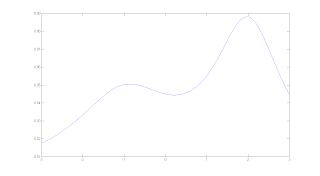
M-file, single-variable function integration and boundary on fixed interval
%This is a simple f(x) function
function y =bumpy(x)
%this function draws a bumpy curve
y=1/(4*pi)*(1./((x-2).^2+1)+1./((x+0.5).^4+32)+1./((x+1).^2+2));
%This is how to integrate the function on (-3,3), with tolerance of 10^(-6)
quad('bumpy', -3, 3, 10^(-6))
%This is how to find the minimum boundary of x and y, on (-1.2, 1)
xmin=fminbnd('bumpy',-1.2, 1)
ymin=bumpy(xmin)
%How to find the maximun boundary?
%find minimum boundary for y=-f(x)
%This is example is from Introduction to Matlab with numerical preliminaries by Alexander Stanoyevitch.
function y =bumpy(x)
%this function draws a bumpy curve
y=1/(4*pi)*(1./((x-2).^2+1)+1./((x+0.5).^4+32)+1./((x+1).^2+2));
%This is how to integrate the function on (-3,3), with tolerance of 10^(-6)
quad('bumpy', -3, 3, 10^(-6))
%This is how to find the minimum boundary of x and y, on (-1.2, 1)
xmin=fminbnd('bumpy',-1.2, 1)
ymin=bumpy(xmin)
%How to find the maximun boundary?
%find minimum boundary for y=-f(x)

%This is example is from Introduction to Matlab with numerical preliminaries by Alexander Stanoyevitch.
How do I know if the file name already exist or not?
I tried to save a M-file and was told the file name already exist. How do i know that before I start saving it?
This function would help:
exist ('file_name_you_want_to_check')
Possible output are 0,1,2,3,4,5,6,7,8. However, only 0 means that the file name does not exist and is available to you.
This function would help:
exist ('file_name_you_want_to_check')
Possible output are 0,1,2,3,4,5,6,7,8. However, only 0 means that the file name does not exist and is available to you.
Sunday, February 14, 2010
Find the element you want in matrix
a =
1 2 3
1 3 4
1 4 5
2 5 6
2 6 7
3 7 8
2 8 9
1 0 1
2 1 2
the command:
b = find ( a ( : , 1 )= =2)
returns following results:
b =
4
5
7
9
the coomand:
c= a ( b , : )
returns following results:
c =
2 5 6
2 6 7
2 8 9
2 1 2
This is how to pick out all the rows in which the first element is 2 in matrix a and put them into c. I could have used this to handle my ozone historic data and it will be much easier.
1 2 3
1 3 4
1 4 5
2 5 6
2 6 7
3 7 8
2 8 9
1 0 1
2 1 2
the command:
b = find ( a ( : , 1 )= =2)
returns following results:
b =
4
5
7
9
the coomand:
c= a ( b , : )
returns following results:
c =
2 5 6
2 6 7
2 8 9
2 1 2
This is how to pick out all the rows in which the first element is 2 in matrix a and put them into c. I could have used this to handle my ozone historic data and it will be much easier.
Sunday, February 7, 2010
Use stopwatch to measure the time elapsed
run 3D random walk for 30 times and get the average time of each run.
% random walk
for k=1:30
tic;
x=[];
y=[];
z=[];
x(1)=0;
y(1)=0;
z(1)=0;
tTotal=0;
for i=1:1000
J=rand*6;
if J<1
x(i+1)=x(i)+1;
y(i+1)=y(i);
z(i+1)=z(i);
elseif (J>1)&(J<2)
x(i+1)=x(i)-1;
y(i+1)=y(i);
z(i+1)=z(i);
elseif (J>2)&(J<3)
x(i+1)=x(i);
y(i+1)=y(i)+1;
z(i+1)=z(i);
elseif (J>3)&(J<4)
x(i+1)=x(i);
y(i+1)=y(i)-1;
z(i+1)=z(i);
elseif (J>4)&(J<5)
x(i+1)=x(i);
y(i+1)=y(i);
z(i+1)=z(i)+1;
else
x(i+1)=x(i);
y(i+1)=y(i);
z(i+1)=z(i)-1;
end
end
plot3(x,y,z)
t(i)=toc;
tTotal=tTotal+t(i);
end
tAve=tTotal/10;
when i=1:2000, tAve=0.0032s
when i=1:4000, tAve=0.0114s
when i=1:6000, tAve=0.0506s
when i=1:12000, tAve=0.1882s
when i=1:24000, tAve=0.8823s.
when i=1:48000, tAve=2.7501s.
% random walk
for k=1:30
tic;
x=[];
y=[];
z=[];
x(1)=0;
y(1)=0;
z(1)=0;
tTotal=0;
for i=1:1000
J=rand*6;
if J<1
x(i+1)=x(i)+1;
y(i+1)=y(i);
z(i+1)=z(i);
elseif (J>1)&(J<2)
x(i+1)=x(i)-1;
y(i+1)=y(i);
z(i+1)=z(i);
elseif (J>2)&(J<3)
x(i+1)=x(i);
y(i+1)=y(i)+1;
z(i+1)=z(i);
elseif (J>3)&(J<4)
x(i+1)=x(i);
y(i+1)=y(i)-1;
z(i+1)=z(i);
elseif (J>4)&(J<5)
x(i+1)=x(i);
y(i+1)=y(i);
z(i+1)=z(i)+1;
else
x(i+1)=x(i);
y(i+1)=y(i);
z(i+1)=z(i)-1;
end
end
plot3(x,y,z)
t(i)=toc;
tTotal=tTotal+t(i);
end
tAve=tTotal/10;
Resutls:
when i=1:1000, tAve=0.0012swhen i=1:2000, tAve=0.0032s
when i=1:4000, tAve=0.0114s
when i=1:6000, tAve=0.0506s
when i=1:12000, tAve=0.1882s
when i=1:24000, tAve=0.8823s.
when i=1:48000, tAve=2.7501s.
Thursday, July 23, 2009
Subscribe to:
Posts (Atom)